
One of the fastest ways to make a video sound more professional has nothing to do with expensive microphones or advanced editing software. It comes down to one simple thing: balancing the voice and the music.
Get it right, and viewers stay engaged. Get it wrong, and even a well-produced video can become frustrating to watch.
Whether you’re creating YouTube tutorials, documentaries, online courses, podcasts, social media videos, marketing content, or short films, the same rule applies: your audience should never struggle to understand what is being said.
In this guide, you’ll learn practical audio levels, common mixing mistakes, and simple techniques that can immediately improve your videos.
1. Voice and Music Cheat Sheet
If you’re looking for a quick answer, start here.
| Content Type | Voice Level | Music Level |
|---|---|---|
| YouTube Tutorial | -3 dB | -25 dB |
| Documentary | -3 dB | -22 dB |
| Educational Course | -3 dB | -28 dB |
| Vlog | -3 dB | -20 dB |
| Podcast Video | -3 dB | -28 dB |
| Corporate Presentation | -3 dB | -24 dB |
| Trailer | -3 dB | -15 dB |
| Social Media Reel | -3 dB | -18 dB |
These numbers are not strict rules, but they provide an excellent starting point for most projects.
The Golden Rule
Your voice should typically be 15 to 25 dB louder than your background music.
If viewers have to make an effort to understand what is being said, the music is too loud.
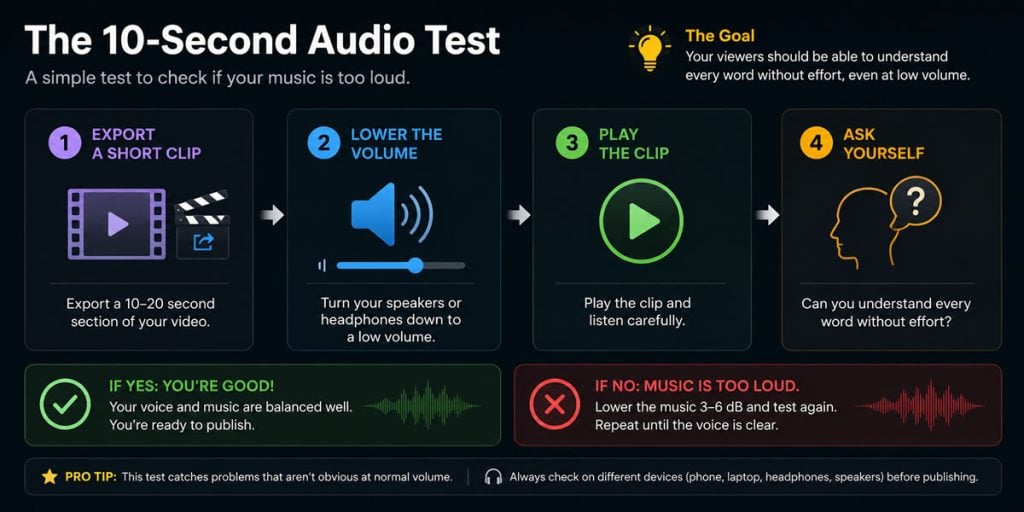
2. The 10-Second Test
Many creators spend hours tweaking audio levels when a simple test can reveal the problem in seconds.
Try this:
- Export a short section of your video.
- Turn your speakers down to a low volume.
- Play the clip.
- Listen carefully.
Can you understand every word without effort? If not, your music is probably too loud. This quick test often catches problems that aren’t obvious when listening at normal volume.
3. Why Voice Should Always Come First
Viewers are surprisingly forgiving when it comes to visuals. They’ll watch a video recorded on a smartphone if the information is useful. Audio is different. When speech becomes difficult to understand, attention drops quickly. Viewers become distracted, miss important information, and are more likely to leave.
Background music should support the message, not compete with it.
Think of music as a supporting actor. It helps create emotion, atmosphere, and pacing, but it shouldn’t become the star of the scene when someone is speaking. A good mix feels natural. The viewer focuses on the message while the music quietly does its job in the background.
4. Best Music Categories for Voice-Overs
Not every genre works equally well underneath narration. Some styles naturally leave room for speech, while others compete for attention.
Ambient Music
Ambient tracks are often ideal for documentaries, educational videos, cinematic storytelling, and explainers. Because they focus on atmosphere rather than strong melodies, they rarely interfere with spoken dialogue.
Piano Music
Piano music works particularly well for emotional storytelling, documentaries, interviews, and personal videos. A simple piano arrangement can add emotion without distracting the audience.
Corporate Music
Corporate tracks are specifically designed for presentations, tutorials, online courses, and business content. They tend to be predictable, balanced, and easy to mix beneath speech.
Acoustic Music
Acoustic guitar and light instrumental arrangements are popular in travel videos, lifestyle content, and vlogs. They create warmth without overwhelming narration.
Lo-Fi Music
Lo-fi remains a popular choice for study videos, productivity content, and relaxed social media content. Its softer production style makes it easier to place underneath dialogue than many modern commercial genres.
5. Music Genres That Often Cause Problems
Some music styles require extra attention when used under speech.
Rock Music
Heavy guitars often compete directly with the human voice.
EDM
Large synths, powerful drums, and aggressive drops can quickly overpower narration.
Pop Music
Songs with vocals create competition because the listener is trying to process two voices at the same time.
Metal
Dense arrangements and distorted instruments leave very little room for dialogue.
Full Orchestral Music
Epic cinematic music can sound fantastic, but large orchestral arrangements often contain too many competing elements. If you’re using orchestral music beneath narration, keep the level lower than you think you need.
6. Common Mixing Mistakes
1. Starting With The Music
Many creators adjust the music first and then add the voice. Do the opposite. Start with the voice at a comfortable level, then slowly raise the music until it supports the mood without affecting clarity.
2. Keeping Music At The Same Volume
Music doesn’t need to stay at one level throughout the entire video. During important dialogue, lower it. During visual sequences without speech, let it become more prominent.
Most modern editing software can automate this process through a feature called audio ducking. Premiere Pro, DaVinci Resolve, CapCut, and other editors can automatically lower music whenever speech is detected, saving a lot of manual editing time.
3. Choosing The Wrong Track
Sometimes the problem isn’t the mix. It’s the music itself. A simple ambient track will almost always be easier to mix than a busy orchestral arrangement or energetic pop song.
4. Using Music With Lyrics
Lyrics compete directly with spoken words. For voice-over projects, instrumental music is almost always the better choice.
7. Quick Settings for Popular Video Editors
Not every creator uses the same editing software, and audio controls vary from one program to another. Fortunately, you don’t need perfect settings to achieve a professional result.
The values below are intended as starting points. Use them to establish a solid voice-to-music balance, then fine-tune by ear until the dialogue remains clear and easy to understand.
CapCut
- Voice: 100%
- Music: 15% to 25%
A quick note about percentages versus decibels: CapCut uses percentages, while professional editors such as Premiere Pro and DaVinci Resolve use decibels (dB). The two systems don’t translate directly. A heavily mastered track can still sound very loud at 25%, so treat these values as starting points rather than fixed rules.
Adobe Premiere Pro
- Dialogue Peaks: around -3 dB
- Music: around -20 dB to -25 dB
DaVinci Resolve
- Dialogue: around -3 dB
- Music: around -22 dB
These settings won’t be perfect for every project, but they provide a reliable starting point.
8. Troubleshooting Audio Problems
Even with the right music and recommended volume levels, audio issues can still happen. Sometimes the voice lacks clarity, the music feels distracting, or the overall mix simply doesn’t sound balanced.
The tables below cover some of the most common problems content creators encounter, along with simple fixes you can try before reaching for advanced audio tools.
If Your Voice Sounds…
| Problem | Solution |
| Hard to hear | Lower music 3–6 dB |
| Thin | Add warmth around 200–400 Hz |
| Boomy | Reduce 100–250 Hz |
| Inconsistent volume | Add light compression |
| Muffled under music | Lower music or use ducking |
If Your Music Sounds…
| Problem | Solution |
| Too quiet | Raise level slightly |
| Fighting with voice | Lower music 2–4 dB |
| Too loud during speech | Use ducking |
| Distracting | Choose a simpler arrangement |
9. Choosing the Right Music Before You Start
Good mixing starts long before you touch a volume slider.
Look for tracks that:
- Are instrumental
- Have a consistent volume
- Avoid sudden dramatic changes
- Leave room for narration
- Match the pace of your content
Many mixing problems disappear simply by choosing better music. For documentaries, ambient and piano music often work best. For tutorials, corporate and acoustic tracks are usually safe choices.
For vlogs and lifestyle content, acoustic and lo-fi tracks remain popular because they feel natural and approachable.
If you’re looking for suitable background music, browse our royalty-free music library at DL Sounds. You’ll find thousands of tracks across genres including Ambient, Piano, Corporate, Acoustic, Lo-Fi, and Cinematic. For additional editing and music workflow tips, PremiumBeat is also worth exploring.
10. A Quick Note About LUFS
You may occasionally hear creators talking about LUFS, which stands for Loudness Units Full Scale.
Unlike peak levels, LUFS measures the overall perceived loudness of a video.
Platforms such as YouTube and TikTok use loudness normalization, meaning they may automatically turn down videos that are significantly louder than their recommended targets.
For most creators, maintaining clear dialogue and avoiding excessive master volume is more important than chasing a specific LUFS value. However, understanding that these platforms adjust loudness behind the scenes can help explain why a video sometimes sounds quieter after upload than it did during editing.
Royalty-Free Music for Voice-Overs
Finding the right music makes mixing dramatically easier. If you’re looking for background music that works well under narration, focus on instrumental tracks with clean arrangements and predictable dynamics. Categories such as Ambient, Piano, Corporate, Acoustic, and Lo-Fi are often excellent choices because they support the message rather than compete with it.
Looking for music that works well under voice-overs? Explore our collection of royalty-free tracks created for content creators, filmmakers, educators, marketers, and video editors.
Final Thoughts
Most creators spend hours choosing the right camera angle, transition, thumbnail, or color grade. Yet one of the fastest ways to improve a video is often much simpler: lowering the music a few decibels. If viewers can understand every word clearly without effort, your content immediately feels more professional. Start with the voice. Keep the music supportive. Use the 10-second test before publishing. And remember: if you’re wondering whether the music is too loud, it probably is.
Related articles
Want to improve your editing workflow, audio choices, and overall content quality? These related guides will help you work smarter with music, sound, and video production.
-
From Crossfades to Mid/Side Processing: 50 Audio Editing Techniques
Learn practical audio editing techniques for cleaner voice-overs, smoother transitions, and better sounding projects. -
How to Sync Music in Your Edit Like a Pro
Discover simple techniques for matching music to cuts, transitions, and visual moments for a more professional edit. -
How Creators Will Edit, Publish and Use Music in 2026
Explore how modern creators are changing the way they edit, publish, and use music across platforms. -
How to Edit a Music Video for Free: Complete Beginner’s Guide
A practical beginner’s guide for editing music videos without expensive software or complicated workflows. -
30+ YouTube Video Ideas for Photographers and Filmmakers
Find useful video ideas for creators who want to publish more consistently and make better use of music and visuals.